Imaging tools built
around the clinician.

Ukubona is a free Windows DICOM viewer for radiologists and clinicians. Open any study instantly, collaborate with colleagues, and call on AI assistance when it helps your review.
Features

Everything you need in the reading room

Designed around real clinical workflows. Not demos, tools that actually get used.

Fast DICOM loading across all modalities

CT MRI X-Ray Ultrasound PET

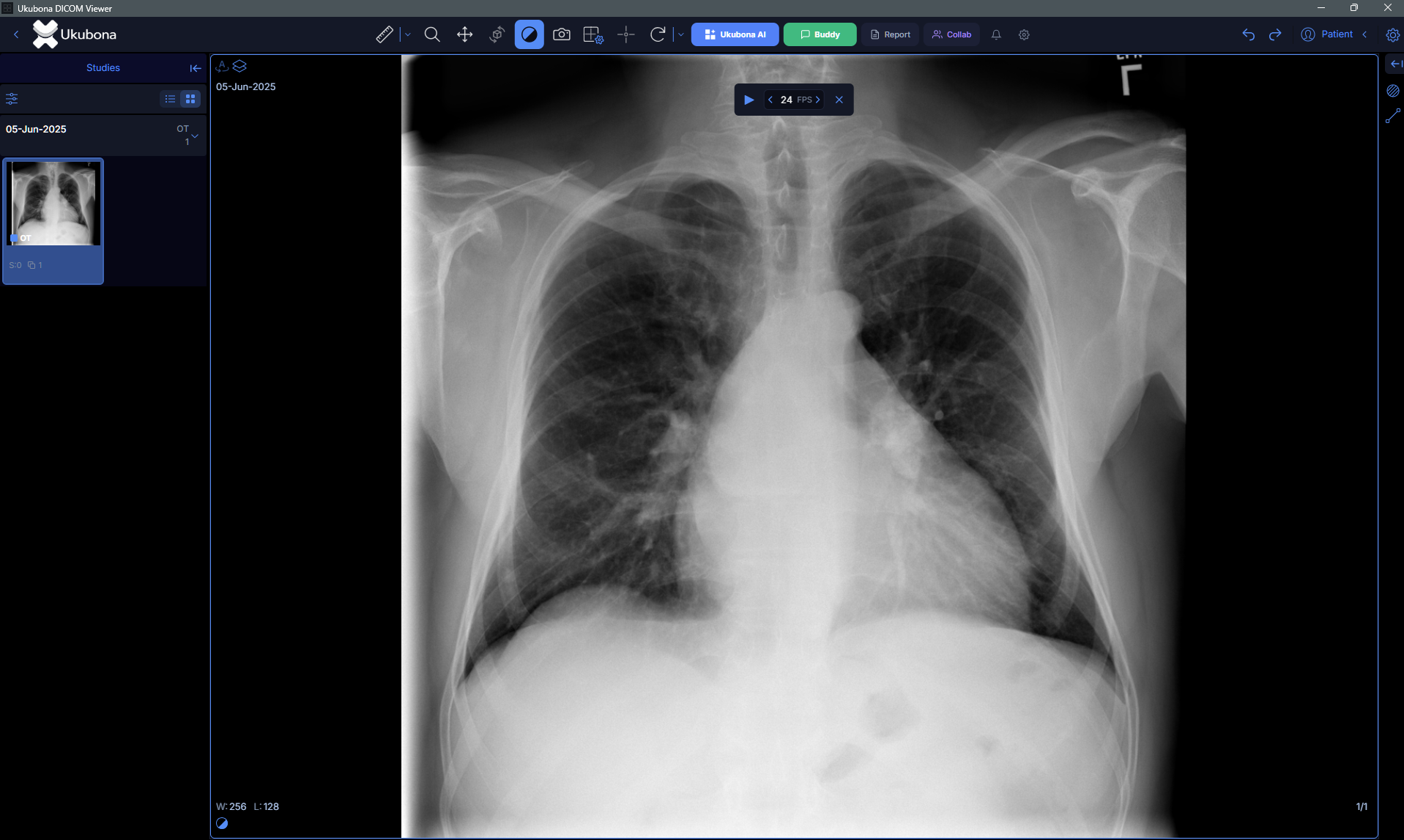
Open entire studies in seconds. Ukubona streams slices progressively so you can start reading while the rest loads. Supports CT, MRI, X-Ray, Ultrasound, PET, and NM.

Buddy: an AI assistant that listens, not lectures

Conversational AI Second opinion Contextual

Ask it about findings, request a second read on a region, or talk through a differential. It assists your review without overriding your judgment. Always available, never intrusive.

Collaborative radiology for multidisciplinary teams

Real-time Annotations Remote consult

View the same study simultaneously with colleagues anywhere. Annotate, mark regions of interest, and discuss findings in real time. Built for MDT meetings without complex setup.

AI analysis that supports your clinical judgment

Region detection Measurements Flagging

Ukubona surfaces regions of interest and relevant measurements in the background. It highlights, it does not decide. The final read is always yours.

MPR and advanced visualization tools

Multi-planar reconstruction Window / Level Measurement tools

Reconstruct any volume in axial, sagittal, and coronal planes simultaneously. Apply window and level presets per modality. Length, area, angle, and Hounsfield unit sampling.

Works offline, connects to your existing setup

Offline capable PACS compatible Network shares

No internet required for local studies. Queries PACS systems, reads local DICOM directories, and works with network shares without reconfiguration. Native Windows install.

Structured reporting built into the viewer

Structured templates Voice transcription PDF export Clinician sharing

Draft, edit, and finalise radiology reports without switching applications. Reports are linked to the study, support structured templates, and can be exported as PDF or shared directly.

Getting started

Up and running in minutes

No licensing fees, no activation keys. Just sign up, download, and open your studies.

Download

Head to viewer.ukubona.cloud — sign in (or create a free account) and the download starts right away. Single file, under 50 MB.

Install

Run the installer on any Windows 10 or Windows 11 (64-bit) machine. Takes about 60 seconds.

Open your DICOMs

Drag-and-drop a DICOM folder or connect to your PACS. Start reading immediately.

Free download

Download Ukubona

Free for Windows 10 and Windows 11 (64-bit). No subscription. Free to sign up. Updates are automatic.

Windows 10 / 11  ·  64-bit  ·  ~50 MB

Free account  ·  No credit card  ·  No subscription

FAQ

Common questions

Can't find an answer? Email us.

Yes. Ukubona DICOM Viewer is completely free to download and use. There is no trial period, no feature paywall, and no subscription. A free account is required to access cloud features and collaboration.
Ukubona supports all standard DICOM formats including CT, MRI, X-Ray (CR/DR), Ultrasound, PET, and NM modalities. Multi-frame DICOM, enhanced DICOM, and most vendor-specific transfer syntaxes are supported out of the box.
Local studies never leave your machine unless you explicitly use the sharing features. When collaboration features are used, data is encrypted in transit. We do not sell or share patient data.
The desktop application currently targets Windows 10 and Windows 11 (64-bit). A macOS version and a web-based viewer are on the roadmap. If you have an urgent need for a specific platform, contact us at hello@ukubona.cloud.
Yes. Ukubona supports DICOM networking and can query and retrieve studies from any standards-compliant PACS. It works alongside your existing workflow without requiring replacement of your current infrastructure.
Buddy is Ukubona's built-in AI assistant. You can ask it questions about findings, request analysis of specific regions, or discuss a case. It uses context from the current study and gives you a conversational response. Buddy is an assistant, not a replacement for your clinical judgment.
No. The AI features in Ukubona are decision-support tools. They surface information, highlight regions, and assist your review. All clinical decisions remain with the qualified clinician. Ukubona is not a diagnostic device and does not replace specialist review.
Collaboration in Ukubona is session-based. You or a colleague initiates a session and shares a link. Both parties can view the same study simultaneously, add annotations, and communicate in real time. Sessions are encrypted. No study data leaves your infrastructure unless you explicitly share it.
Yes. Local studies open and play back entirely offline. Internet connectivity is only required for cloud-based collaboration, AI analysis that uses server-side models, and receiving automatic updates.
Updates are delivered automatically when you are connected. You will be notified when a new version is available and can choose when to apply it. No manual reinstallation is required.
Contact

Get in touch

Questions, feedback, or partnership inquiries. We respond to every message.

We typically respond within one business day. For urgent clinical support questions, include “URGENT” in your subject line.

What we can help with

  • Installation and setup help
  • PACS integration questions
  • Feature requests and bug reports
  • Clinical partnership and research
  • Enterprise or institutional licensing